Blog
How to register for VAT in the UK (Step-by-Step Guide)
Magnolia Roy | 08 August 2026
A practical step-by-step guide for UK SMEs, sole traders, and growing businesses on when VAT registration becomes compulsory, how the £90,000 VAT threshold works, and what to prepare before applying through HMRC. Learn how registering for VAT affects pricing, invoicing, bookkeeping, cash flow, Making Tax Digital compliance, and ongoing VAT returns, plus the common mistakes to avoid.
If your business turnover is approaching the VAT threshold, knowing when to register for VAT is essential. Register too late and you could face penalties. Register too early and it may affect pricing and cash flow.
To register for VAT in the UK, you need to apply to HMRC, usually online, once your VAT taxable turnover goes over the registration threshold or when you expect it to do so within the next 30 days.
For most UK SMEs, VAT registration becomes compulsory when taxable turnover is more than £90,000 in a rolling 12-month period.
For many founders, VAT feels like the moment the business becomes “serious”.
Suddenly, you are not just thinking about sales. You are thinking about pricing, invoices, HMRC deadlines, software, and whether VAT will affect your cash flow.
This guide explains when to register for VAT, how to do it, and what to prepare before and after registration.
TL;DR
You must register for VAT in the UK when your VAT taxable turnover exceeds £90,000 in a rolling 12-month period, or when you expect it to exceed that amount within the next 30 days. VAT registration affects pricing, invoicing, bookkeeping, and cash flow, so tracking turnover regularly, registering on time, and using the right accounting setup can help you avoid penalties and stay compliant.
When do you need to register for VAT?
You must register for VAT if your VAT taxable turnover is more than £90,000 in a rolling 12-month period.
You must also register if you expect your VAT taxable turnover to go over £90,000 in the next 30 days.
VAT registration at a glance
Question | Answer |
Current VAT registration threshold | £90,000 |
Time period used | Rolling 12 months |
Is this based on your tax year? | No |
Can you register voluntarily? | Yes |
Main HMRC registration route | Online |
Standard VAT rate | 20% for most goods and services |
Founder takeaway: VAT registration is usually triggered by growth, but it needs planning before the deadline arrives.
What does it mean to register for VAT?
To register for VAT means telling HMRC that your business is responsible for VAT.
Once registered, you may need to:
- Charge VAT on taxable sales
- Keep VAT records
- Submit VAT returns
- Pay VAT due to HMRC
- Follow Making Tax Digital rules for VAT
VAT is not just a tax task. It affects your pricing, cash flow, bookkeeping, and customer communication.
What counts towards the VAT threshold?
VAT taxable turnover is the total value of sales that are not VAT exempt.
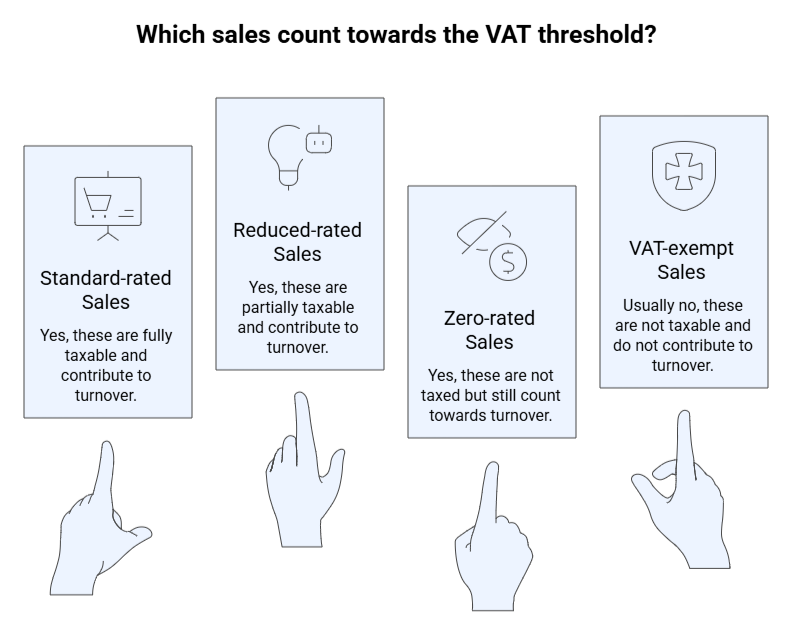
This is where founders often get caught out.
Zero-rated sales still count towards VAT taxable turnover, even though the VAT rate is 0%.
Should you register voluntarily?
You can register for VAT voluntarily even if your turnover is below £90,000.
Voluntary registration may help if:
- You sell mainly to VAT-registered businesses
- You want to reclaim VAT on eligible costs
- You have large startup or equipment expenses
- You want your business to appear more established
But it may not help if:
- You sell mainly to consumers
- Your customers cannot reclaim VAT
- Adding VAT would make your prices less competitive
Voluntary VAT registration: quick decision table
Your situation | Possible benefit | Possible downside |
They may reclaim VAT | More admin | |
You sell to consumers | Less useful commercially | Prices may rise |
You have high VATable costs | You may reclaim VAT | Records must be accurate |
You want stronger systems | Better bookkeeping discipline | VAT deadlines become routine |
Simple rule: voluntary VAT registration is a pricing and cash flow decision, not just a tax decision.
How to register for VAT in the UK
Most businesses can register for VAT online through HMRC.
Step 1: Check whether registration is compulsory
Review your taxable turnover every month.
Ask:
- Have you gone over £90,000 in the last 12 months?
- Will a new contract push you over £90,000 in the next 30 days?
- Are you taking over a VAT-registered business?
If the answer is yes, you may need to register.
HMRC says that if your business goes over the threshold, you must register within 30 days of the end of the month when you crossed it.
Step 2: Gather your business details
Before you register for VAT, prepare the details HMRC may ask for.
- Business name and trading name
- Business address
- Business activity details
- Turnover figures
- Bank details
- UTR or company details
- Director or partner details
Having these ready makes the process smoother.
Step 3: Choose the right VAT accounting setup
When you register for VAT, you also need to think about how VAT will be handled in your accounts.
VAT approach | How it works | Useful when |
VAT is usually based on invoice dates | You have straightforward invoicing | |
VAT is based on payments received and made | You want to protect cash flow | |
VAT is calculated using a fixed percentage of VAT-inclusive turnover | You want simpler VAT calculations |
The best option depends on your margins, costs, payment terms, and customers.
Founder insight: the wrong VAT setup can create unnecessary cash flow pressure.
Step 4: Apply through HMRC
You can apply through the GOV.UK VAT registration service.
After you apply, HMRC will confirm your VAT registration details.
Important point: Do not issue VAT invoices showing VAT separately until HMRC has issued your VAT registration number. Once you receive your VAT number, you may need to issue VAT invoices for sales made from your effective date of registration. HMRC guidance says that once you have your VAT number, you should issue any required VAT invoices within 30 days.
Step 5: Confirm your effective date of registration
Your effective date is the date your VAT responsibilities begin.
This date decides:
- Which sales need VAT
- Which invoices may need adjusting
- Which transactions go on your first VAT return
- When VAT record-keeping starts
If you crossed the threshold in the last 12 months, the effective date is usually the first day of the second month after you went over the threshold.
If you expect to exceed the threshold in the next 30 days, the effective date is the date you realised this would happen.
Step 6: Set up digital VAT records
After you register for VAT, your records need to be ready.
VAT-registered businesses should keep VAT records and submit VAT returns using compatible Making Tax Digital software, unless exempt.
Your software should help you track:
- VAT charged on sales
- VAT paid on purchases
- VAT owed to HMRC
- VAT reclaimable from HMRC
- VAT return deadlines
This is where cloud accounting tools such as Xero, QuickBooks, Sage, or FreeAgent can help.
What happens after you register for VAT?
After you register for VAT, your day-to-day finance process changes.
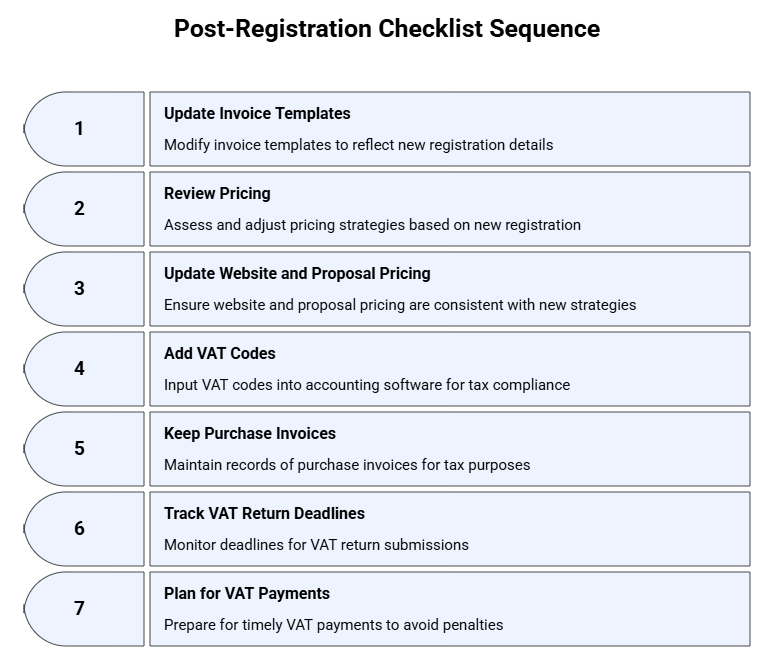
Important: VAT collected from customers is not the same as profit.
A separate VAT savings pot can help you avoid spending money that may need to go to HMRC.
How does VAT affect your pricing?
After you register for VAT, pricing needs a proper review.
The standard VAT rate is 20% for most goods and services.
For example, if your current price is £1,000, adding 20% VAT means your customer pays £1,200.
You then need to decide whether to:
- Add VAT on top of your current price
- Absorb VAT within your current price
- Adjust packages or service levels
- Review margins before quoting new work
For VAT-registered B2B clients, VAT may be less of an issue because they may be able to reclaim it.
For consumers or non-VAT-registered customers, VAT can feel like a real price increase.
Common VAT registration mistakes
1. Checking turnover only at year end
VAT uses a rolling 12-month period. Waiting for year-end accounts can mean you spot the problem too late.
2. Forgetting about a large contract
A single contract can trigger the need to register for VAT if you expect turnover to go over the threshold in the next 30 days.
HMRC gives an example of arranging a £100,000 contract and needing to register from the date you realised you would exceed the threshold.
3. Charging VAT before getting your VAT number
Do not show VAT separately on invoices until HMRC issues your VAT registration number.
4. Ignoring Making Tax Digital
Most VAT-registered businesses need compatible software for VAT records and submissions.
5. Treating VAT as spare cash
VAT in your bank account may need to be paid to HMRC. Treat it as money held temporarily, not extra income.
When should you get help?
You should get help before you register for VAT if:
- You are close to the £90,000 threshold
- You sell both taxable and exempt products or services
- You trade internationally
- You are unsure which VAT scheme to use
- You have delayed registration
- Your bookkeeping is not up to date
AMS helps UK SMEs, sole traders, and growing companies handle VAT registration, VAT returns, bookkeeping, cloud accounting, and compliance.
The aim is simple: clear records, fewer surprises, and a system that supports growth.
FAQs
1. When do I need to register for VAT in the UK?
You need to register when your VAT taxable turnover is more than £90,000 in a rolling 12-month period, or when you expect it to go over £90,000 in the next 30 days.
2. Can I register for VAT before reaching the threshold?
Yes. You can register voluntarily if your turnover is below £90,000. This may help if you sell to VAT-registered clients or want to reclaim VAT on eligible costs.
3. Do I need software after VAT registration?
Yes. VAT-registered businesses should keep VAT records and submit VAT returns using compatible Making Tax Digital software, unless exempt.